
I’m going to be honest with you — I had no idea what I was doing when I started this project.
I’m a computer science student in Israel, currently in my final year. Between assignments, exams, and trying to have something that resembles a social life, I had maybe 5-10 hours a week to spare. But I had this idea stuck in my head: what if I could build a website that basically runs itself? One that researches trending topics, writes articles, optimizes them for SEO, and publishes them — all automatically, every single day, while I’m sitting in a lecture hall?
So in March 2026, I decided to actually try it. And the result is the site you’re reading right now — AI Tool Hub.
Here’s the full story of how I built it, what it cost me (spoiler: almost nothing), and what I learned along the way.
The Idea: Why AI Tools?
I spend a lot of time using AI tools for my coursework. Claude for understanding complex algorithms. ChatGPT for brainstorming. Cursor for coding assignments. Perplexity for research. I realized I was constantly Googling “best AI tool for X” and finding the same generic listicles that all say the same thing.
I thought: I actually use these tools daily. I have real opinions. And if I combine that with an automated content system, I could build something that’s both useful and (hopefully) generates some passive income.
The niche picked itself — AI tools, reviews, comparisons, and tutorials.
The Budget: $2.98. No, Really.
Here’s my total investment:
- Domain (aitoolhub.blog): $2.98/year on Namecheap. That’s it. That’s roughly 11 Israeli shekels.
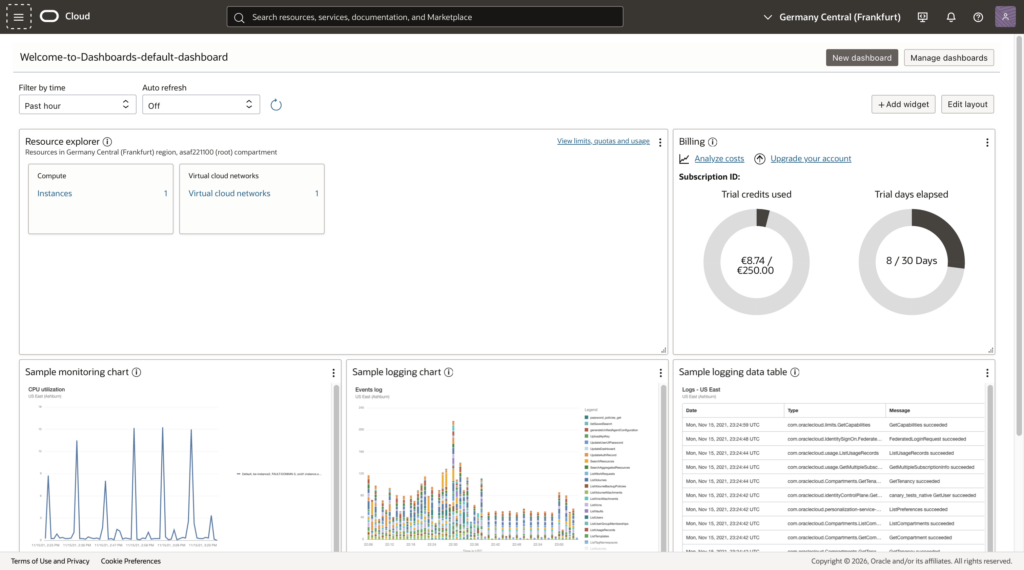
- Server: Oracle Cloud free tier. 1 CPU, 12GB RAM, Ubuntu 24.04. Completely free, forever.
- WordPress + Astra theme: Free.
- SSL certificate: Let’s Encrypt. Free.
- AI API (Claude): I use the Anthropic API, which costs roughly $0.50-1.00 per article. My monthly bill is under $15.
- Image API (Pexels): Free.
Total monthly cost: about $15 for API calls. Everything else is free.
I’m not going to pretend this is a “zero cost” project — the API calls add up. But compared to any other business, this is insanely cheap to run.
The Tech Stack
The whole system runs on a single Python script that I call the “AI Content Factory.” Here’s what it looks like under the hood:
- Server: Oracle Cloud VPS running Ubuntu 24.04, Apache, MySQL, PHP
- Website: WordPress with the Astra theme and Yoast SEO
- Content Pipeline: Python with 10 specialized “agents”
- AI Model: Claude (Anthropic API) for all text generation
- Images: Pexels API for stock photos
- Research: SerpAPI for finding trending topics
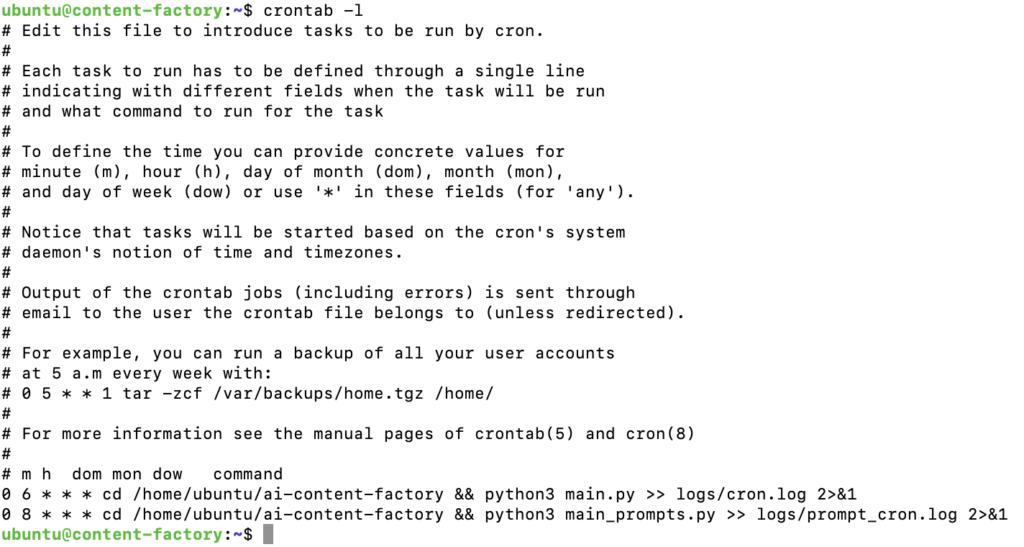
The pipeline runs automatically every morning at 8:00 AM via a cron job. By the time I wake up, there’s a fresh article draft waiting for me.
How the Pipeline Works
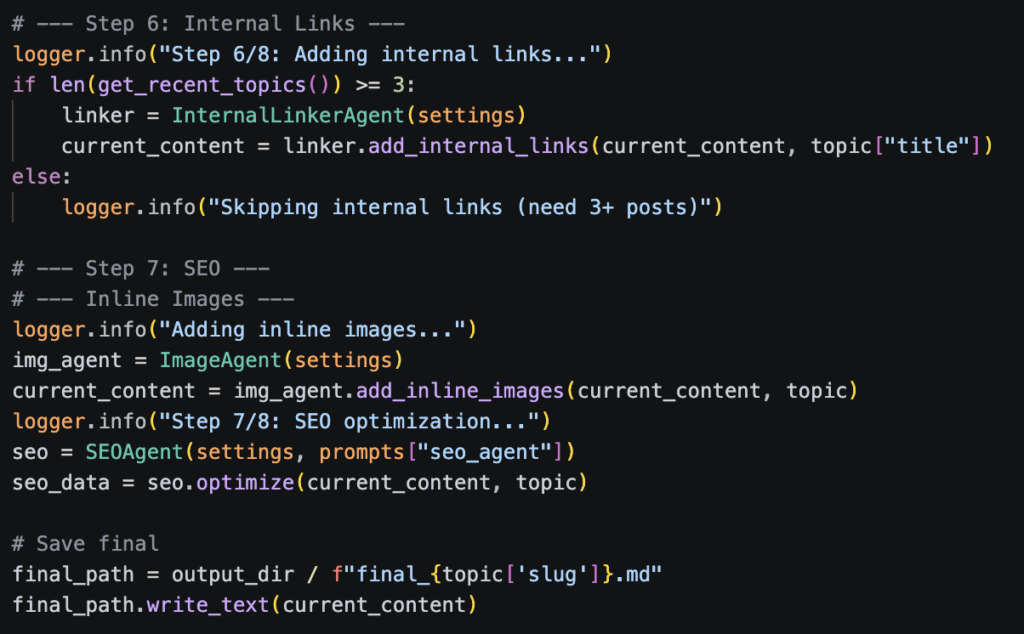
I built 10 separate “agents” — each one handles a specific step in the content creation process. Think of it like an assembly line in a factory:
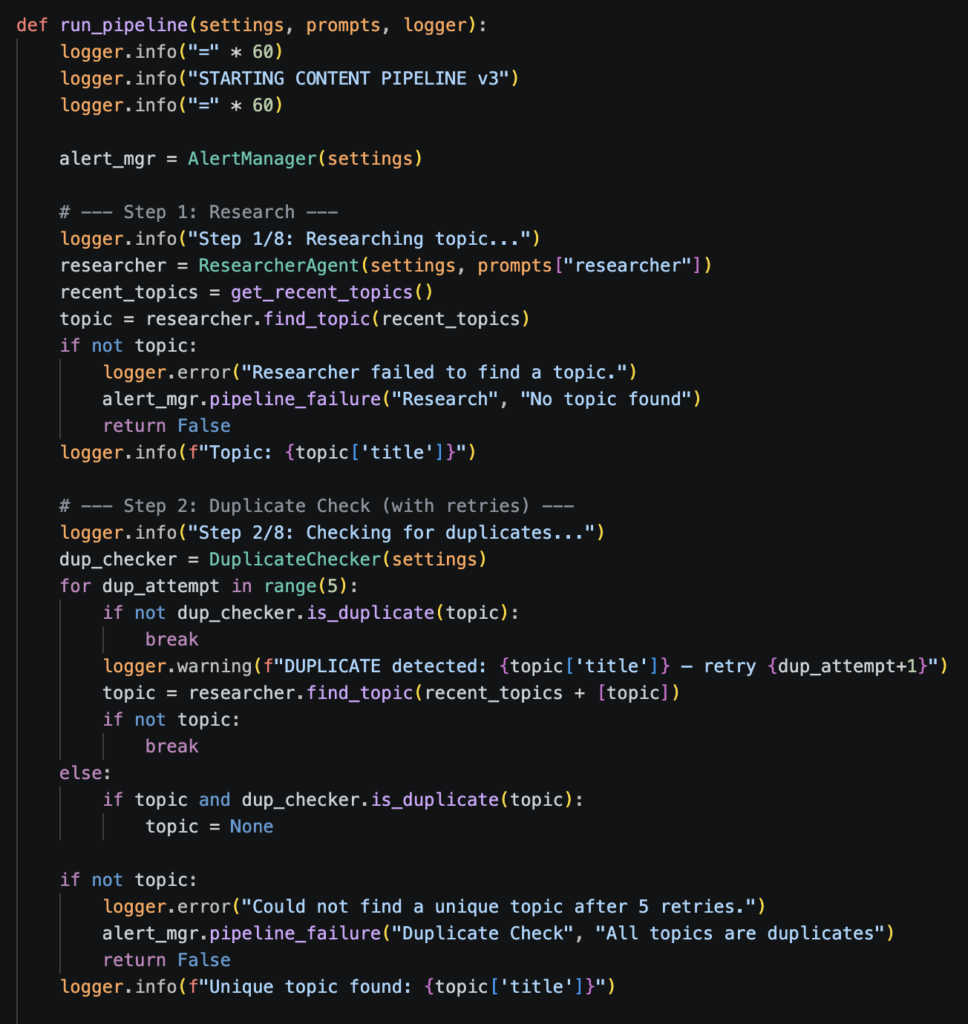
1. Researcher Agent — Scans Google Trends and search results to find a trending AI topic that hasn’t been covered yet.
2. Duplicate Checker — Compares the topic against everything we’ve already published. If it’s too similar, the Researcher tries again (up to 5 times).
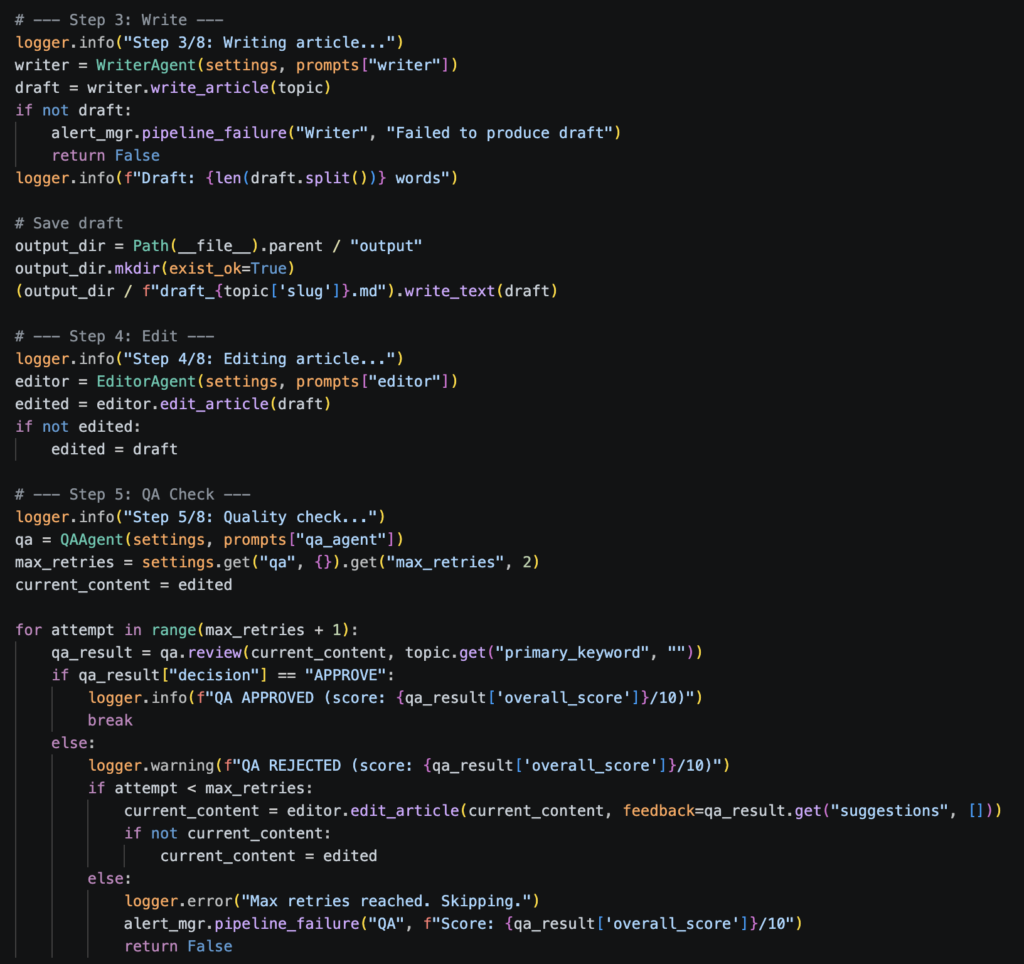
3. Writer Agent — Takes the topic and generates a full article draft — usually 1,500-2,500 words with headers, examples, and tool recommendations.
4. Editor Agent — Rewrites the draft to sound more natural and less robotic. This was one of the hardest prompts to get right.
5. QA Agent — Scores the article on a scale of 1-10. If it scores below 7, the article goes back to the Editor for another round. If it fails twice, it’s rejected entirely.
6. Internal Linker — Adds links to other articles on the site, which is important for SEO.
7. Image Agent — Finds relevant images from Pexels and adds them to the article.
8. SEO Agent — Generates the meta title, description, slug, and tags.
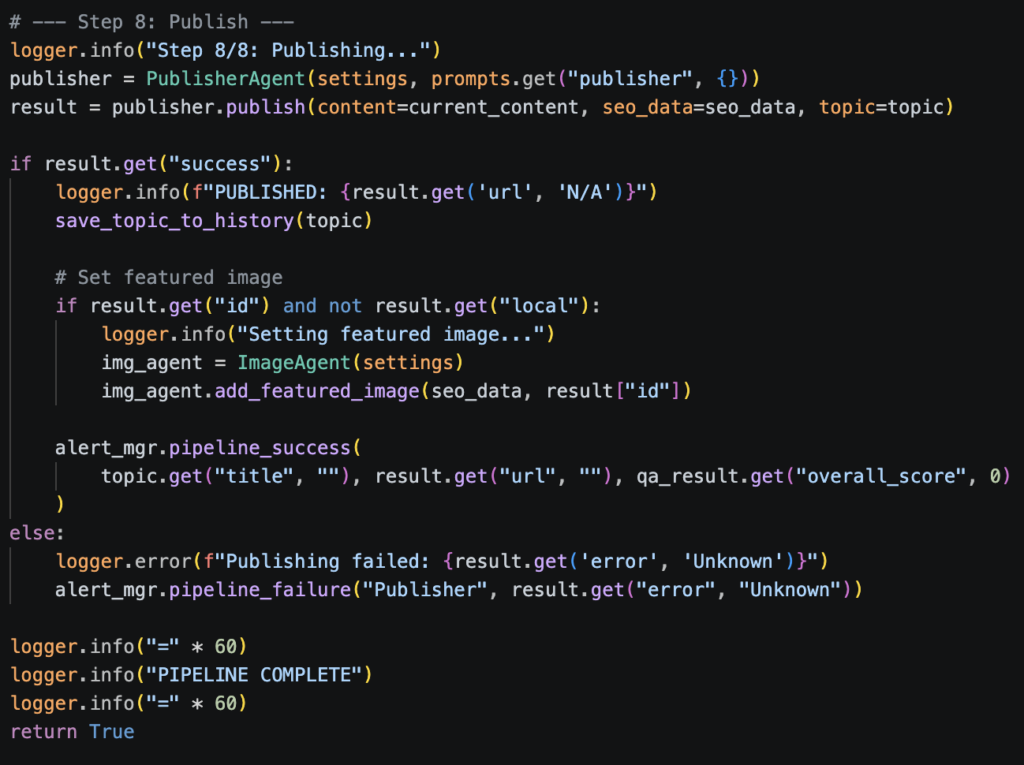
9. Publisher — Pushes everything to WordPress via the REST API.
10. Alert Manager — Sends me an email if anything breaks (though I haven’t set this up yet, to be honest).
The whole process takes about 2-3 minutes per article. The API cost is usually under $1.
The Mistakes I Made (So You Don’t Have To)
Let me save you some pain:
Mistake #1: Publishing too fast. In the first week, I let the pipeline publish everything automatically. 30+ articles in 6 days. Google noticed. Out of 193 pages, only 11 got indexed. The rest were flagged as “Crawled — currently not indexed.” I learned that Google needs to trust your site first, and flooding it with automated content is the opposite of building trust.
Mistake #2: No human touch. My early articles were 100% AI-generated. They were fine technically, but they all sounded the same. No personality, no screenshots, no “I actually tried this and here’s what happened.” I’ve since switched to a hybrid model — AI generates the draft, I add the human layer.
Mistake #3: AdSense rejection. I applied for Google AdSense and got rejected for “low value content.” It stung, but it made sense. Google could tell the content was automated. I’m working on fixing this now by adding personal posts like the one you’re reading.
Mistake #4: JavaScript in WordPress. I built free tools (a Pomodoro timer, word counter, etc.) using JavaScript inside WordPress Custom HTML blocks. WordPress kept breaking the code by converting special characters. The fix was separating HTML from JavaScript — putting the JS in a separate snippet via WPCode plugin.
What I’d Do Differently
If I started over today, here’s what I’d change:
- Start with manual posts first. Build 10-15 genuinely good articles before turning on any automation. Let Google trust you first.
- Focus on tools earlier. The free online tools (word counter, password generator, etc.) are my best pages for engagement. Users actually stay and use them. I wish I’d built these from day one.
- Set up Pinterest from the start. I’m only now setting up Pinterest automation, but pins have an incredibly long lifespan compared to social media posts. I lost weeks of potential traffic.
- Keep the pipeline as a draft generator, not a publisher. The AI is great at research and first drafts. But the final version should always have a human pass.
Where Things Stand Now
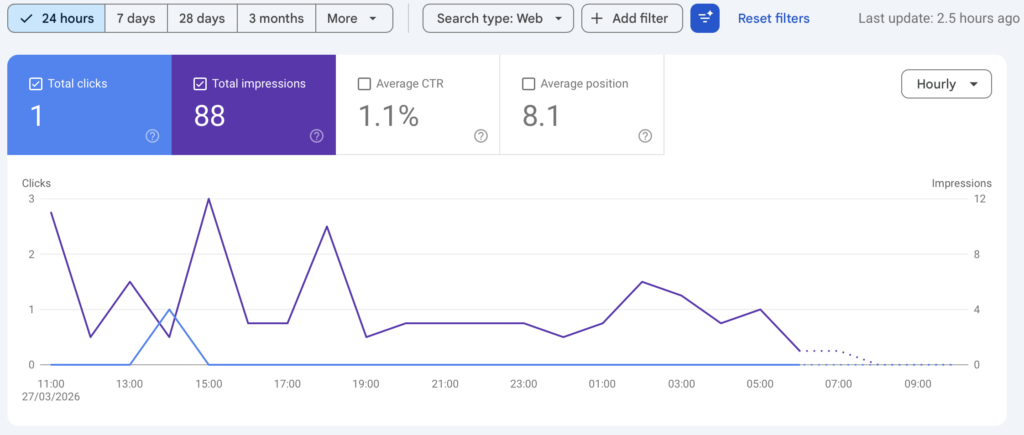
As I write this (late March 2026), the site has been live for about a week. Here are the honest numbers:
- 396 impressions on Google Search
- 1 click (my first! 🎉)
- 11 pages indexed out of 193
- 30+ articles published
- 10 free tools built and live
- 80-tool AI directory as the homepage
- $0 revenue so far (but I’m working on it)
The impression graph is trending sharply upward, which is encouraging. SEO is a long game — most experts say it takes 3-6 months for a new site to gain real traction. I’m trying to be patient.
The Plan Going Forward
My target is 1,000-2,000 ILS per month in passive income within 6 months. Here’s how I plan to get there:
- More free tools — I’m adding 5 more this month (case converter, countdown timer, color palette generator, etc.)
- Affiliate marketing — Signing up for programs with Jasper, Surfer SEO, NordVPN, and others
- Pinterest automation — Auto-generating pins from blog posts
- YouTube Shorts — Faceless AI tool demos (screen recordings + AI voiceover)
- Quality over quantity — One well-edited post per day beats five generic ones
Will it work? I honestly don’t know. But the infrastructure is built, the costs are minimal, and the content machine is running. The worst case scenario is that I built a solid portfolio project that demonstrates Python, API integration, and full-stack thinking.
And the best case? I’m making money while sleeping. Every CS student’s dream.
Want to Build Something Similar?
If you’re a student or developer thinking about starting an automated content project, here’s my advice: start small, start free, and don’t expect overnight results. Use Oracle Cloud’s free tier for hosting. Use WordPress because it’s battle-tested. And treat AI as your assistant, not your replacement — the human element is what makes content actually rank in 2026.
I’ll be documenting my journey here on AI Tool Hub. If you want to follow along, bookmark the site or check back in a month — I’ll write a follow-up post with updated numbers and lessons learned.
If you have questions about the technical setup, feel free to reach out through the contact page. I’m happy to help fellow students figure this stuff out.
This post was written entirely by me, not generated by AI. Though I’d be lying if I said I didn’t use Claude to help me outline it. The irony is not lost on me.